To do this set up, you MUST have 4 bridges, not 3. If you are unsure about the equipment you have, please contact support and we can advise you further.
Warning! Not all sideline batteries will supply enough power. You must have a battery with high capacity. See the links below for batteries you can purchase
Flash Fish High Capacity Battery on Amazon: https://a.co/d/08rEGCBh
Apowking High Capacity Battery on Amazon: https://a.co/d/02aGvcxd
Overview:
This is a guide on how to convert our standard setup to the alternate setup and is not a full setup guide. Basically for this setup, we will be swapping the pressbox bridge antennas and the pressbox router with sideline switch and the sideline switch.
This will make the Sideline the main "hub" that the network runs through. In stadiums with a lot of interference, this is a more ideal way to arrange the network equipment.
Sideline Equipment Setup
You will be moving the Pressbox kit to the Sideline
Equipment Overview - Pressbox Kit:
|
1.) Extension Cable/Power Strip 2.) Router & Switch Power Supplies 3.) Pressbox Router 4.) Pressbox Switch 5.) HDMI Cable 6.) EDGE Box Ethernet Cable |
7.) EDGE Box 8.) EDGE Box Power Cord 9.) Sideline iPad antenna (Ultra) 10.) Two Pressbox Bridge Antennas 11.) Sideline Bridge Antenna Tripod (not pictured) 12.) Sideline POE injector 13.) Sideline Battery (not pictured) |
Step 1: Power up the Pressbox Kit
Simply plug the extension cord of the provided power strip into the battery from the sideline kit.
Step 2: Turn on the sideline Battery
Different Batteries are going to have different methods for turning them on. Ensure your battery is on and supplying power to the router. The router and it's power cord should both have lights that turn on within a minute or two of being plugged in.
If your sideline station has an extension cord or wall outlet, you can use that instead of a battery
Step 3: Attach both Pressbox Bridges to the Tripod
Using the mounting clamps, attach the Pressbox Bridge Antennas to the tripod as shown below
- The orange Pressbox-to-Sideline antenna will be pointed directly at the Sideline Bridge antenna which will now be located in the PRESSBOX.
- The blue Pressbox-to-Endzone antenna will be pointed directly at the Endzone Bridge antenna.
The Pressbox kit should be set up on the 25 Yard Line on the SAME SIDE as your Endzone for the game.
-
IDEALLY THE BRIDGES WILL HAVE A CLEAR SHOT OF WHERE THE OTHER BRIDGES WILL BE SET UP FREE OF OBSTRUCTIONS.
- If possible, the bridge antennas should not be behind glass or in a narrow space. Nearby structures, glass, metal, or unrelated electronic equipment may cause interference. Place away from all of the above so that it has an open line of sight with the other Bridges.
Step 4: Connect All 3 Antennas to the Pressbox Router & Switch
Connect the black Ethernet cable from the Pressbox iPad Antenna (with ears) to the blue colored sticker port on the router labeled "iPad Antenna".
Connect the black Ethernet cables from both round Pressbox Bridge antennas to the black colored sticker ports on the Switch labeled "Bridge." It does not matter which bridge is plugged into each black port. They are interchangeable.
See the photo below for which antennas should go where when you're done:
NOTE: POE injector must be used for the Ultra as shown below: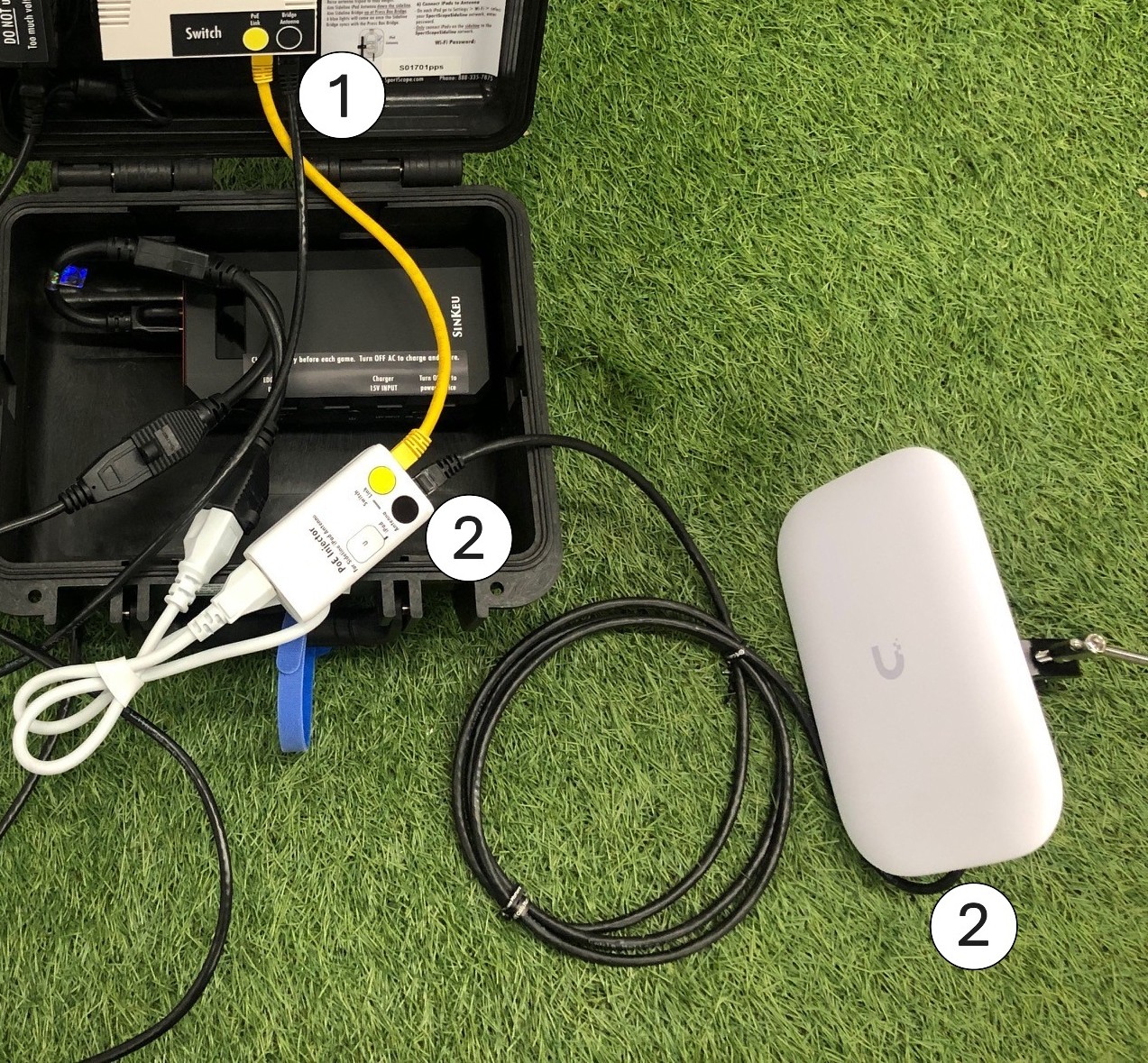
Step 5: Angle the Antennas
The Pressbox Bridge Antenna (orange sticker) needs to be aimed directly at the corresponding orange Pressbox-to-Sideline Bridge Antenna that is up in the Pressbox.
The Pressbox Bridge Antenna (blue sticker) needs to be aimed directly at the corresponding blue Pressbox-to-Endzone Bridge Antenna that is in the Endzone
The Ultra antenna needs to be facing down the sideline toward where your iPads will be on the field.
Pressbox Equipment Setup
Equipment Overview - Sideline Kit:
|
1.) Sideline Switch 2.) Switch Power Supply 3.) Sideline Bridge Antenna 4.) Will not be used here (should be on the sideline with the pressbox kit) |
5.) Pressbox iPad antenna (picture on the right) 6.) Pressbox Edge Box (not pictured) 7.) Antenna Tripod (not pictured) |
Step 1: Power up the Sideline Kit
Simply plug the extension cord of the provided power strip into an AC outlet inside the pressbox. You may need an additional extension cord depending on your pressbox
Step 2: Attach the Sideline Bridge to the Tripod or another Object and Position OUTSIDE the Pressbox as much as possible
Using the mounting clamp, attach the Sideline Bridge Antenna to the tripod as shown below or to some object on the outside of the pressbox, for example a pole or window edge. The antenna will be pointed at the Pressbox-to-Sideline Bridge (orange) located on the Sideline
- You may also clamp the antenna to another object outside of the pressbox - you are not required to use the tripod.
Angle this antenna at the Pressbox-to-Sideline Bridge (orange) located on the Sideline where the Pressbox kit will be set up. The Pressbox kit should be set up on the 25 Yard Line of YOUR sideline for the game.
-
MAKE SURE THE BRIDGE HAS A CLEAR SHOT OF WHERE THE OTHER BRIDGES WILL BE SET UP FREE OF OBSTRUCTIONS.
- The antenna cannot be behind glass or in a narrow space. Nearby structures, glass, metal, or unrelated electronic equipment may cause interference. Place away from all of the above so that it has an open line of sight with Bridges on the field.
Step 3: Plug in the antennas
Plug the antennas into the switch where the black stickers are
Step 4: Plug in the Pressbox EDGE Box to the switch
Plug the EDGE box's ethernet into the open slot on the switch directly to the LEFT of the two antennas and set up the EDGE box as normal. Plug in the camera via HDMI and the power cord into power.